
Download Zenquiz – AI‑Powered Quiz Generator for Students, Teachers & Teams
Overview
Zenquiz is an AI‑driven web application that transforms ordinary study notes into interactive quizzes with just a few clicks. Whether you are a high‑school student preparing for finals, a university professor designing assessments, or a corporate trainer building compliance tests, Zenquiz offers a fast, secure, and flexible way to convert content from Word, PDF, Notion, Google Drive, or plain text into practice exams. The platform’s core strength lies in its ability to understand the hierarchical structure of your material—headings, sub‑headings, bullet points, and highlighted terms—and automatically generate multiple‑choice, true/false, and fill‑in‑the‑blank questions that closely mimic real‑world testing scenarios.
In addition to question creation, Zenquiz provides instant feedback, progress tracking, and collaborative sharing, making it a comprehensive learning tool for both individual study and group environments. By leveraging advanced natural language processing, the AI ensures that each quiz aligns with the original learning objectives while maintaining an engaging format that encourages active recall. The result is a seamless workflow where users spend less time formatting and more time mastering the content they need to know.
Moreover, Zenquiz continuously learns from user edits, refining its question‑generation algorithms over time, which means the more you use it, the smarter it becomes. This adaptive capability positions Zenquiz as a long‑term partner in education, rather than a one‑off utility.
Features & How to Get Started
- AI‑generated questions in multiple formats (multiple choice, true/false, fill‑in‑the‑blank).
- One‑click import from Word, PDF, Notion, Google Drive, and plain text files.
- Customizable quiz length, difficulty level, and question type distribution.
- Instant feedback with explanations for every answer.
- Progress dashboards that highlight strengths and knowledge gaps.
- Collaborative sharing via link or embedded code for classrooms and teams.
- Secure cloud storage with end‑to‑end encryption.
- Regular AI model updates to improve question relevance and accuracy.
Installation & Usage Instructions
Getting started with Zenquiz is deliberately simple, and you don’t need to download any software because it runs entirely in the browser. First, visit the official website and create a free account using your email address or a single‑sign‑on option such as Google or Microsoft Azure AD. After confirming your registration through a quick verification email, you’ll land on a clean, modern dashboard where the prominent “Create New Quiz” button beckons.
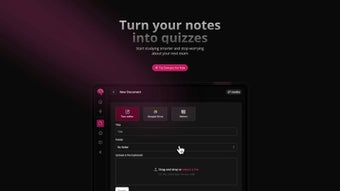
Click it, and you’ll be prompted to upload your source material. Drag‑and‑drop a Word document, PDF, or connect directly to your Notion workspace or Google Drive folder. Zenquiz’s AI then scans the text, identifies headings, bullet points, and key concepts, and suggests a quiz layout based on the content’s complexity and your chosen parameters.
From there, you fine‑tune the quiz by selecting the desired number of questions, the mix of question types, and the difficulty level (easy, medium, hard). You can also edit any generated question manually, replace answer choices, or add supplemental hints to suit your teaching style. Once you confirm, the platform instantly builds the quiz, which you can preview, share via a unique URL, embed in a learning management system, or export as a printable PDF.
For educators, the “Assign to Class” feature automatically distributes the quiz to enrolled students, tracks completion rates, and aggregates scores in real‑time. Business users can export results to CSV for deeper reporting or integrate with analytics platforms via a simple webhook. The entire workflow—from import to quiz generation—typically takes under five minutes, allowing you to focus on learning rather than formatting.
Zenquiz also offers a “Saved Templates” library, enabling you to reuse favorite configurations for future quizzes, which further speeds up repetitive tasks.
Compatibility, Pros & Cons
Zenquiz is a cloud‑based solution, meaning it runs on any modern web browser regardless of operating system. Whether you are on Windows 10/11, macOS Ventura, a Linux distribution, or mobile platforms such as Android 9+ and iOS 13+, you can access all features without downloading additional software. The service is fully responsive, offering a seamless experience on desktops, tablets, and smartphones, and it automatically adjusts layout elements to suit touch‑screen interactions.
For organizations with strict IT policies, Zenquiz supports SSO integration with Azure AD, Okta, OneLogin, and other identity providers, ensuring compliance with corporate security standards while simplifying user management. Additionally, the platform complies with GDPR, CCPA, and FERPA, and it provides data‑residency options for enterprises that require storage within specific geographic regions. All communications are protected by TLS 1.3 encryption, and files at rest are secured with AES‑256 encryption, giving you confidence that your intellectual property remains private.
Pros
- Fast AI‑powered quiz generation saves hours of manual work, especially for large curricula.
- Supports a wide range of source file formats for flexibility and accommodates existing workflows.
- Instant feedback and detailed analytics help learners track progress and identify knowledge gaps.
- Collaborative features encourage group study, classroom interaction, and corporate training.
- Free tier available with generous limits; premium plans add advanced analytics, white‑labeling, and priority processing.
- Regular AI model updates ensure continuous improvement in question relevance and linguistic accuracy.
Cons
- Reliance on internet connectivity; offline mode is not currently offered, which can be limiting for travelers.
- AI may occasionally misinterpret highly technical jargon or niche terminology, requiring manual edits.
- Advanced customization options, such as full branding control and API access, are limited to paid subscriptions.
- While the free tier is generous, storage caps and export limits may require an upgrade for power users.
FAQ & Conclusion
Below you’ll find answers to the most common questions about Zenquiz, followed by a concise conclusion that highlights why this tool stands out in the crowded educational‑tech market.
Is Zenquiz really free to use?
Yes, Zenquiz offers a robust free tier that includes unlimited quiz generation, basic analytics, and cloud storage for up to 10 GB. The free plan also allows you to share quizzes publicly and collaborate with up to 50 users. Premium plans start at $9.99 per month and unlock additional features such as advanced reporting, white‑labeling, priority AI processing, and higher storage limits.
Can I import notes directly from Google Classroom?
While Zenquiz does not integrate with Google Classroom as a native plug‑in, you can import the same files stored in Google Drive, which is commonly used alongside Classroom. Simply locate the document in your Drive, select it during the upload step, and Zenquiz will generate the quiz as usual. Future roadmap items include a direct Classroom connector to streamline this workflow.
How secure is my data on Zenquiz?
All files are encrypted in transit using TLS 1.3 and encrypted at rest with AES‑256. Zenquiz complies with GDPR, CCPA, and FERPA, and the service undergoes regular third‑party security audits. Premium plans also offer optional data‑residency choices, allowing enterprises to store data within specific geographic regions for added compliance.
Can I customize the feedback explanations?
Absolutely. After the AI generates a quiz, you can edit each explanation, replace it with your own text, or add multimedia elements such as images or video links. This flexibility ensures that feedback aligns perfectly with your curriculum, corporate guidelines, or personal teaching style, and it can be saved as part of a custom template for future quizzes.
Is there an offline version for travelers?
Currently Zenquiz is a cloud‑only service, so an internet connection is required for AI processing and data synchronization. The development team has announced that an offline mode, which would allow local quiz generation using a lightweight client, is under consideration for a future release. Until then, you can prepare content ahead of time and use the mobile‑optimized web interface when you have intermittent connectivity.
In summary, Zenquiz delivers a modern, AI‑enhanced approach to turning raw study material into effective, interactive quizzes. Its ease of use, cross‑platform compatibility, and collaborative features make it a compelling choice for students, educators, and businesses alike. The free tier provides ample capability for individuals and small teams, while the premium plans scale gracefully for large institutions that demand advanced analytics and branding control.
Whether you need a quick practice test for a single chapter or a full‑scale assessment for an entire course, Zenquiz streamlines the process while providing valuable insights that guide learning outcomes. Ready to boost your study efficiency and create engaging assessments in minutes? Download Zenquiz today, build your first quiz instantly, and experience a smarter way to learn.
Zenquiz impresses with its lightning‑fast AI quiz generation and intuitive interface. While occasional misinterpretations of niche terminology require a quick edit, the overall value—especially for free users—is outstanding. The platform’s collaborative sharing, detailed analytics, and secure cloud storage set it apart from traditional flashcard apps and make it a versatile tool for both education and corporate training.



.png)



